

How to Open a DOCX File Without Microsoft Word on Windows
Need to open a DOCX file without Microsoft Word? This guide shows how to open a DOCX file without Microsoft Word on Windows, read the document, edit it and save it again. You can use a free Windows word processor such as Herisoft Writer instead of paying for a Microsoft 365 subscription.
We explain what a DOCX file is, how to open a DOCX file without Microsoft Word, which free DOCX options are available, and how to edit a document or export it to PDF. The steps are designed for Windows users who want a practical answer without unnecessary software or an online upload.
What is a DOCX file?
DOCX is the standard document format used by modern versions of Microsoft Word. It can contain formatted text, headings, lists, tables, images, headers and footers. Because DOCX is widely supported, you do not need Microsoft Word specifically to open or edit it.
If you want more background about Word and document formats, Microsoft’s official Word support is a useful reference. For everyday work, however, the best choice depends on whether you need to view a file, make changes, work offline or export the finished document as a PDF.
How to open a DOCX file without Microsoft Word
There are several ways to open a DOCX file without Microsoft Word. A desktop word processor is often the simplest choice on Windows because it lets you work with local files without uploading them to an online service.
1. Use Herisoft Writer on Windows
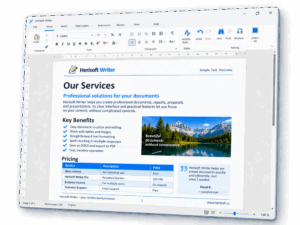
Herisoft Writer is a free text editor for Windows that can open and edit DOCX documents. It is designed for everyday writing and includes formatting tools, tables, images, spell checking, printing and PDF export. For most Windows users, this is the most direct way to open a DOCX file without Microsoft Word because the file stays on the computer.
- Download Herisoft Writer for Windows.
- Install the application or use the portable version.
- Start Herisoft Writer and choose Open.
- Select the DOCX file on your computer.
- Edit the document and save it when you are finished.
This option is useful if you want a free DOCX editor that works as a Windows application instead of an online document editor. It is also a practical option when you need to open a DOCX file without Microsoft Word while travelling or working offline.
2. Open the document in Google Docs
Google Docs can open DOCX files in a web browser. This can be useful when you need to access a document from different devices or collaborate with other people. The Google Docs Help Center explains the service’s document workflows.
The main trade-off is that the document has to be uploaded to an online service. Formatting can also change when a complex Word document is imported and converted, so check the result before sharing it.
3. Use another desktop office application
LibreOffice and other office suites can also open DOCX documents. The official LibreOffice Writer page describes its broader writing and formatting features. These applications are useful when you need a larger office suite, but they may be more extensive than necessary for simple writing and editing.
Why use Herisoft Writer as a DOCX editor?
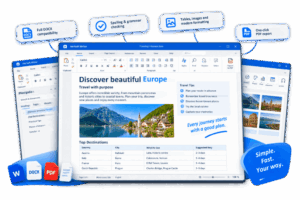
Herisoft Writer focuses on the features most people need for everyday documents. It is a suitable Word alternative for Windows users who want a straightforward desktop application. As a free Word alternative, Herisoft Writer lets you open a DOCX file without Microsoft Word and continue working offline.
- Open and edit DOCX documents.
- Work with local files on Windows 10 and Windows 11.
- Use a familiar ribbon-style interface.
- Format text with headings, lists and paragraphs.
- Insert tables and images.
- Use spell checking while writing.
- Print documents and export them to PDF.
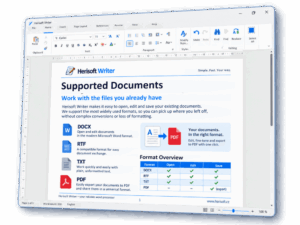
- Open RTF, TXT and HTML files as well as DOCX.
- Use the portable version when you do not want a traditional installation.
- Work in Czech and other supported languages.
The free version includes the document editing features. The Pro version is available as a one-time purchase rather than a monthly or yearly subscription.
How to edit a DOCX file on Windows
After you open a DOCX file without Microsoft Word, you can edit it in the same way as a normal text document:
- Click in the paragraph you want to change.
- Add, remove or replace text.
- Use the formatting tools to change headings, fonts, lists or alignment.
- Insert a table or image when the document needs additional information.
- Review the document with spell checking.
- Save the edited file as DOCX.
Keep a copy of the original document before making substantial changes. This gives you a safe version to return to if the formatting needs to be restored.
How to convert a Word document to PDF
PDF is often the best format for sending a finished document because its layout usually remains consistent on different computers. To export a DOCX document to PDF:
- Open the document in Herisoft Writer.
- Check the page layout and use print preview if available.
- Choose the PDF export option.
- Select where you want to save the PDF file.
- Open the PDF and check the final result before sending it.
Always check page breaks, tables, images, headers and footers before sharing the PDF. These are the elements most likely to affect the final layout.
DOCX viewer or DOCX editor: what is the difference?
A DOCX viewer is mainly used to open and read a document. A DOCX editor also lets you change the text, formatting and document structure.
If you only need to read a file, a viewer may be enough. If you need to correct a document, add a table, insert an image or save a new version, choose a full DOCX editor instead. This distinction matters when you are looking for a free way to open a DOCX file without Microsoft Word.
Common DOCX compatibility problems
Most ordinary DOCX documents open without difficulty, but complex files can contain features that are specific to Microsoft Word. Keep these points in mind:
- Check whether the same fonts are installed on both computers.
- Review tables and page breaks after opening the file.
- Check headers, footers and images before printing.
- Review the document after exporting it to PDF.
- Save a copy in the original format before changing the document.
Frequently asked questions
Can I open a DOCX file without Microsoft Word?
Yes. You can open a DOCX file without Microsoft Word by using a free desktop word processor such as Herisoft Writer, an online service such as Google Docs, or another office application that supports the DOCX format.
Can I edit a DOCX file for free?
Yes. Herisoft Writer can be used to open and edit DOCX documents in its free version. The application is designed for Windows and works with local documents.
Can I open a DOCX file offline?
Yes. A desktop application can open local DOCX files without requiring an online document editor. This is useful when you are working without an internet connection or prefer to keep files on your computer.
Can I save a DOCX file as PDF?
Yes. Open the document in a word processor that supports PDF export, check the layout and export the finished document as a PDF.
What is the best free Word alternative for Windows?
The best option depends on what you need. If you want a simple Windows application for everyday DOCX editing, spell checking, printing and PDF export, Herisoft Writer is a practical choice.
Conclusion
You do not need Microsoft Word to open or edit a DOCX file. If you need to open a DOCX file without Microsoft Word on Windows, Herisoft Writer gives you a simple desktop workflow for editing documents, checking spelling, printing and exporting to PDF.