

Best Free Alternative to Microsoft Word for Windows
Compare writing, DOCX, offline work and PDF export options, and find out when a lightweight word processor may be all you need.
How to Choose the Right Word Alternative
What Should a Free Word Alternative Be Able to Do?
- Reliable support for common formats such as DOCX, RTF and TXT.
- Clear tools for headings, lists, tables and images.
- Simple saving and a predictable way to create PDFs.
- Offline work when documents should stay on your computer.
- Easy installation and adequate support for current versions of Windows.
A basic tool may be enough for simple notes. But if you send DOCX files to other people, compatibility and control over page layout matter more.
1. Herisoft Writer: A Lightweight Offline Word Alternative
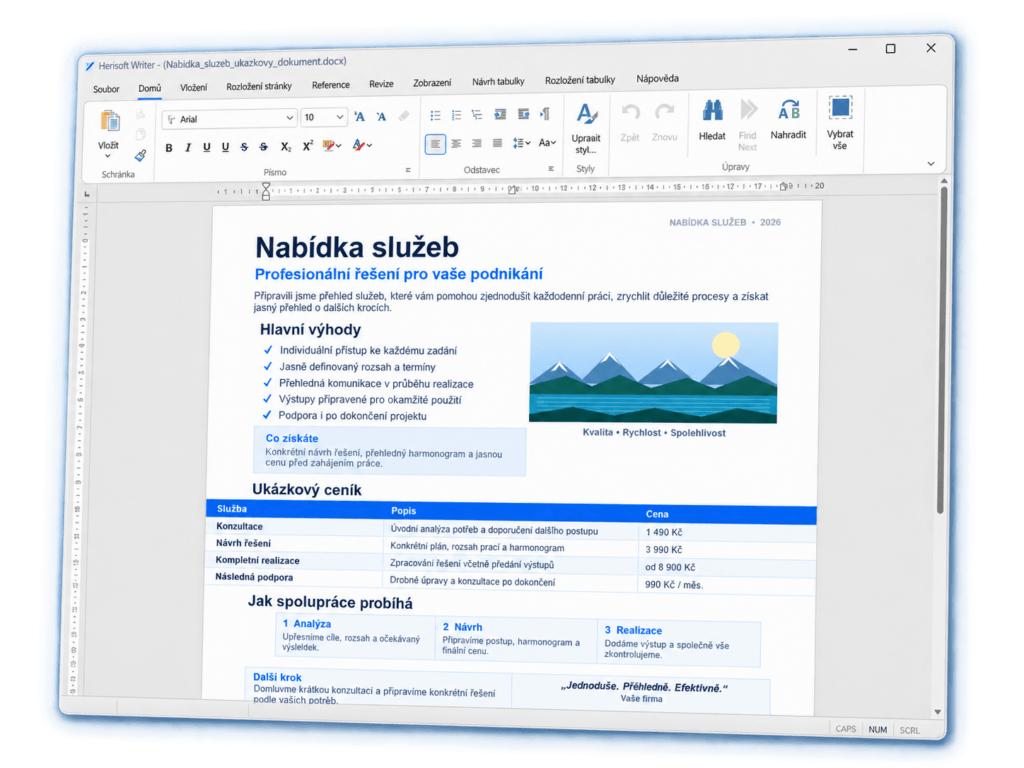
Herisoft Writer is a clear and focused word processor for Windows. It can open and edit DOCX documents and is designed for everyday writing without requiring a Microsoft 365 subscription.
It is suitable for letters, school assignments, forms, notes and business documents when you prefer a focused program to a complete office suite. Herisoft Writer also supports RTF, TXT and HTML, spell checking, tables, images, printing and PDF export.
Why Choose a Lightweight Word Processor?
- Documents can stay stored on your computer.
- You can work without an internet connection.
- The interface focuses on writing and editing documents.
- The portable version can be useful on compatible Windows computers.
- You do not need to install spreadsheet and presentation apps you will not use.
2. Google Docs: An Online Option for Collaboration
Google Docs is useful when several people edit one document or when you switch between devices. Upload the DOCX file to Google Drive, open it in Google Docs and download the result as DOCX or PDF when you are finished.
The advantage is collaboration. The trade-off is processing the document online and the possibility that complex formatting may change. Consider your privacy requirements before uploading contracts, personal files or confidential documents.
3. LibreOffice Writer: A Complete Office Suite
LibreOffice Writer is a powerful free option for users who also need spreadsheets and presentations. It can open many DOCX files and provides extensive formatting features.
It may be more extensive than necessary for a quick text edit. When moving documents between office suites, always check page breaks, fonts, tables and images.
4. Microsoft Word for the Web
Microsoft also offers a browser version of Word for users who want a familiar interface and use a Microsoft account. Available features may vary depending on the account and service settings.
It can be convenient for simple work, but it is still an online workflow and may not offer the same features as the full desktop application.
Which Alternative Is Best for Your Needs?
- Choose Herisoft Writer for focused offline DOCX editing on Windows and everyday text documents.
- Choose Google Docs for real-time collaboration and browser-based work.
- Choose LibreOffice, if you need a broader free office suite.
- Choose Word for the Web, if compatibility with the Microsoft ecosystem matters most to you.
How to Test a Word Alternative
- Open a copy of a real DOCX document.
- Check headings, lists, tables, images and page breaks.
- Edit the document and save it again as DOCX.
- Open the saved copy again and verify your changes.
- Create a PDF and compare it with the original layout.
Free Does Not Always Mean Online
Many people look for a free word processor and assume that a browser service is the only option. A desktop application may be better when you want offline work, predictable file storage or fast document opening.
Consider where your files are stored, whether you need collaboration and how many office features you actually use.
Frequently Asked Questions
What Is the Best Free Word Alternative for Windows?
There is no single solution for everyone. Herisoft Writer focuses on offline DOCX editing, Google Docs excels at collaboration and LibreOffice is better suited to users who need a complete free office suite.
Can a Free Word Alternative Open DOCX Files?
Yes. Herisoft Writer, LibreOffice, Google Docs and Word for the Web can all open DOCX files. Always check the layout of important documents after opening them because complex formatting may vary.
Do I Need an Internet Connection to Edit a Document?
No. Desktop applications such as Herisoft Writer and LibreOffice can work offline. Browser-based tools usually need a connection, although some services provide a limited offline mode.
Does Herisoft Writer Replace a Complete Office Suite?
Herisoft Writer is designed for text documents and everyday writing. If you also need spreadsheets and presentations, a complete office suite will be more suitable.
Conclusion
The best free Word alternative is the one that handles your documents reliably and matches your workflow. For a lightweight Windows word processor with DOCX support and offline editing, try Herisoft Writer. Keep a copy of important files and check their layout before sharing them.